

Introduction
Welcome to the Access by evenTwo REST API.
With our API you can manage your events, its attendees and other related items of an event.
The API uses HTTP standard codes for its responses, and makes use of HTTP verbs to interact with its resources.
The API responses are returned in json format.
All code examples use the Guzzle HTTP client, but any other library can be used.
Dates
To facilitate working with dates, we use UTC dates.
The dates are formatted in ISO-601 format, YYYY-MM-DDTHH:MM:SS, for example, 2021-03-02T11:29:27+00:00
When sending dates to the API, you must send them converted to the UTC timezone and formatted in the ISO-601 format.
HTTP codes
Standard HTTP codes are used in the API responses.
These are the most frequently used.
| Code | Description |
|---|---|
| 200 | OK - The request has been successful |
| 201 | Created - The request has been successful and an item or items have been created |
| 204 | No Content - The response is successful and no content is included in it |
| 400 | Bad Request - The request is invalid |
| 401 | Unauthorized - Your authorization is not valid |
| 403 | Forbidden - You do not have permission to access the resource |
| 404 | Not Found - The request url has not been found |
| 405 | Method Not Allowed - The resource does not allow that method |
| 409 | Conflict - The resource can not be modified, it does not accept the modification |
| 422 | Unprocessable entity - One or more parameters in the request are not valid and need to be reviewed |
Authentication
Obtaining an authentication token
To retrieve access token
$client = new GuzzleHttp\Client();
$response = $client->request(
    'POST',
    'https://api.eventwoaccess.com/oauth/v2/token',
    [
        'form_params' => [
            'client_id' => 'your-api-key',
            'client_secret' => 'your-api-secret',
            'grant_type' => 'client_credentials',
            'scope' => 'event_admin',
        ],
    ]
);
It returns this code
{
    "access_token": "an-access-token",
    "expires_in": 3600,
    "token_type": "bearer",
    "scope": "event_admin"
}
If the api keys are not valid, an error message is returned
{
  "error": "invalid_client",
  "error_description": "The client credentials are invalid"
}
The API uses the OAuth 2.0 protocol to handle the request's authentication.
There are two scopes supported:
event_admin: Allows read/write operationsbasic: Only allows read operations
If no scope is sent, the token will be granted using the basic scope
HTTP Request
POST https://api.eventwoaccess.com/oauth/v2/token
POST Parameters
| Parameter | Type | Description |
|---|---|---|
| client_id | string | API keys public token |
| client_secret | string | Apy keys secret |
| grant_type | string | By default, use the grant_type client_credentials. |
| scope | string | By default, use the scope event_admin. |
Including authentication token in requests
$client = new GuzzleHttp\Client();
$response = $client->request(
    'GET',
    'https://api.eventwoaccess.com/search/attendee',
    [
        'headers' => [
            'Authorization' => "Bearer {$token}",
        ],
        'query' => [
            'q' => 'john',
        ],
    ]
);
After obtaining a token, you have to include it in all requests to the Api.
The preferred way is to include an
authorization header in the request, like the following:
Authorization: Bearer the_token_value
Attendees
List attendees
$client = new GuzzleHttp\Client();
$response = $client->request(
    'GET',
    "https://api.eventwoaccess.com/attendee",
    [
        'headers' => [
            'Authorization' => "Bearer {$token}",
        ],
    ]
);
[{
    "id": "104a78c8-2a66-4568-b3e1-1b4ee743f685",
    "name": "Sample attendee",
    "created_at": "2020-10-16T13:13:39+00:00",
    "email": "sampleattendee@eventwoaccess.com",
    "position": "CEO",
    "company": "Access by Eventwo",
    "active": true,
    "phone_number": "919999999",
    "qr": "https://web.eventwoaccess.com/test-event/attendee/b913de52-d1c7-4f3a-a6a9-ab741513ee1a/qr"
}, {
    "id": "4b7f4024-d52d-4bba-b83d-0f7917a6aabb",
    "name": "Other attendee",
    "created_at": "2020-10-16T13:13:09+00:00",
    "email": "otherattendee@eventwoaccess.com",
    "position": "-",
    "active": true,
    "qr": "https://web.eventwoaccess.com/test-event/attendee/b913de52-d1c7-4f3a-a6a9-ab741513ee1a/qr"
}]
HTTP Request
GET https://api.eventwoaccess.com/attendee
Create an attendee
$client = new GuzzleHttp\Client();
$response = $client->request(
    'POST',
    "https://api.eventwoaccess.com/attendee",
    [
        'headers' => [
            'Authorization' => "Bearer {$token}",
        ],
        'multipart' => [
            [
                'name' => 'name',
                'contents' => 'Sample attendee',
            ],
            [
                'name' => 'email',
                'contents' => "sampleattendee@eventwoaccess.com",
            ],
            [
                'name' => 'position',
                'contents' => 'CEO',
            ],
            [
                'name' => 'company',
                'contents' => 'Access by evenTwo',
            ],

            [
                'name' => 'phone_number',
                'contents' => '919999999',
            ],
            [
                'name' => 'qr_data',
                'contents' => 'CUSTOM-QR-12345',
            ],
            [
                'name' => 'photo',
                'contents' => fopen(DIR.'/photo.jpg', 'r'),
                'filename' => 'some-photo.jpg'
            ],
        ]
    ]
);
{
    "id": "997ff698-d6d4-4b63-a725-576a5342afb6",
    "name": "Sample attendee",
    "created_at": "2021-03-18T12:04:06+01:00",
    "email": "sampleattendee@eventwoaccess.com",
    "position": "Developer",
    "company": "Access by evenTwo",
    "phone_number": "919999999",
    "photo": "https://web.eventwoaccess.com/test-event/attendee/photo/ODrG4KDq1xkKBW3ep4nQG2EZJMz81dNePxqZQE4Y9AokMzplXnL8ole1DnAlEc8zZbnmOBKhRMOkJoy0Ob2mjD3Jv8Bgr6WKR7G5VNgorOv6mdbVPY0jl9A57XRVzYgq",
    "active": true,
    "qr": "https://web.eventwoaccess.com/test-event/attendee/997ff698-d6d4-4b63-a725-576a5342afb6/qr",
    "qr_data": "CUSTOM-QR-12345"
}
422 Missing required field
{
    "message": "Validation failed",
    "errors": [
        {
            "field": "name",
            "code": "missing_field",
            "message": "This value should not be blank."
        }
    ]
}
422 Invalid field
{
    "message": "Validation failed",
    "errors": [
        {
            "field": "email",
            "code": "invalid",
            "message": "This value is not a valid email address."
        }
    ]
}
422 Invalid image
{
    "message": "Validation failed",
    "errors": [
        {
            "field": "photo",
            "code": "invalid",
            "message": "This file is not a valid image."
        }
    ]
}
422 Existing QR code
{
    "message": "Validation failed",
    "errors": [
        {
            "field": "qrData",
            "code": "invalid",
            "message": "There is already another contact with the same QR code"
        }
    ]
}
409 Attendee with same email already exists
{
    "message": "Validation failed",
    "errors": {
        "field": "email",
        "code": "invalid",
        "message": "An attendee with the same email already exists"
    }
}
When you create an attendee, it does not belong to any event.
Usually, the next step is to add it to an event. After adding the attendee to an event, you can perform event related actions like confirming the attendance or rejecting it, for example.
HTTP Request
POST https://api.eventwoaccess.com/attendee
URL Parameters
| Parameter | Required | Type | Description |
|---|---|---|---|
| name | yes | string | Name of the attendee |
| yes | string | Email of the attendee | |
| position | no | string | Position of the attendee |
| company | no | string | Company of the attendee |
| phone_number | no | string | Phone number of the attendee |
| qr_data | no | string | Custom QR code data for the attendee. If not provided, defaults to the attendee's ID |
| photo | no | file | Photo of the attendee. Only accepts image/jpeg, image/png, image/gif.Maximum size 4 MB and maximum dimensions 2048x2048 pixels |
Get an attendee
$client = new GuzzleHttp\Client();
$response = $client->request(
    'GET',
    "https://api.eventwoaccess.com/attendee/<identifier>",
    [
        'headers' => [
            'Authorization' => "Bearer {$token}",
        ],
    ]
);
{
    "id": "b913de52-d1c7-4f3a-a6a9-ab741513ee1a",
    "name": "Sample attendee",
    "created_at": "2020-01-29T09:59:09+00:00",
    "email": "sampleatendee@eventwoaccess.com",
    "position": "CEO",
    "company": "Access by Eventwo",
    "active": true,
    "phone_number": "919999999",
    "qr": "https://web.eventwoaccess.com/test-event/attendee/b913de52-d1c7-4f3a-a6a9-ab741513ee1a/qr",
    "qr_data": "b913de52-d1c7-4f3a-a6a9-ab741513ee1a"
}
Attendee does not exist
Status code: 404
HTTP Request
GET https://api.eventwoaccess.com/attendee/<id>
URL Parameters
| Parameter | Type | Description |
|---|---|---|
| id | string | The id of the attendee to retrieve |
Update an attendee
$client = new GuzzleHttp\Client();
$response = $client->request(
    'PATCH',
    "https://api.eventwoaccess.com/attendee/{$attendeeId}",
    [
        'headers' => [
            'Authorization' => "Bearer {$token}",
        ],
        'multipart' => [
            [
                'name' => 'name',
                'contents' => 'New name',
            ],
            [
                'name' => 'position',
                'contents' => 'New position',
            ],
            [
                'name' => 'qr_data',
                'contents' => 'CUSTOM-QR-12345',
            ],
        ]
    ]
);
Status code: 204
Attendee does not exist
Status code: 404
422 Invalid field
{
    "message": "Validation failed",
    "errors": [
        {
            "field": "email",
            "code": "invalid",
            "message": "This value is not a valid email address."
        }
    ]
}
422 Invalid image
{
    "message": "Validation failed",
    "errors": [
        {
            "field": "photo",
            "code": "invalid",
            "message": "This file is not a valid image."
        }
    ]
}
422 Existing QR code
{
    "message": "Validation failed",
    "errors": [
        {
            "field": "qrData",
            "code": "invalid",
            "message": "There is already another contact with the same QR code"
        }
    ]
}
409 Attendee with same email already exists
{
    "message": "Validation failed",
    "errors": {
        "field": "email",
        "code": "invalid",
        "message": "An attendee with the same email already exists"
    }
}
HTTP Request
PATCH https://api.eventwoaccess.com/attendee/<id>
URL Parameters
| Parameter | Required | Type | Description |
|---|---|---|---|
| name | no | string | Name of the attendee |
| no | string | Email of the attendee | |
| position | no | string | Position of the attendee |
| company | no | string | Company of the attendee |
| phone_number | no | string | Phone number of the attendee |
| qr_data | no | string | Custom QR code data for the attendee. If empty or null, existing QR data is not modified |
| photo | no | file | Photo of the attendee. Only accepts image/jpeg, image/png, image/gif.Maximum size 4 MB and maximum dimensions 2048x2048 pixels |
Activate an attendee
$client = new GuzzleHttp\Client();
$response = $client->request(
    'PUT',
    "https://api.eventwoaccess.com/attendee/{$attendeeId}/activate",
    [
        'headers' => [
            'Authorization' => "Bearer {$token}",
        ],
    ]
);
Status code: 204
Attendee does not exist
Status code: 404
HTTP Request
PUT https://api.eventwoaccess.com/attendee/<id>/activate
URL Parameters
| Parameter | Required | Type | Description |
|---|---|---|---|
| id | yes | string | Identifier of the attendee |
Deactivate an attendee
$client = new GuzzleHttp\Client();
$response = $client->request(
    'PUT',
    "https://api.eventwoaccess.com/attendee/{$attendeeId}/deactivate",
    [
        'headers' => [
            'Authorization' => "Bearer {$token}",
        ],
    ]
);
Status code: 204
Attendee does not exist
Status code: 404
HTTP Request
PUT https://api.eventwoaccess.com/attendee/<id>/deactivate
URL Parameters
| Parameter | Required | Type | Description |
|---|---|---|---|
| id | yes | string | Identifier of the attendee |
Delete an attendee
$client = new GuzzleHttp\Client();
$response = $client->request(
    'DELETE',
    "https://api.eventwoaccess.com/attendee/{$attendeeId}",
    [
        'headers' => [
            'Authorization' => "Bearer {$token}",
        ]
    ]
);
Status code: 204
Attendee does not exist
Status code: 404
422 Attendee has ticket sales
An attendee can not be deleted when it has ticket sales, to avoid losing that data.
{
  "message": "The attendee has bought tickets in an event and can not be deleted"
}
422 Attendee has ticket reservations
An attendee can not be deleted when it has ticket reservations, to avoid losing that data.
{
  "message": "The attendee has reserved tickets in an event and can not be deleted"
}
When removing an attendee, all the data related to the attendee will be removed.
If the attendee has bought tickets or has ticket reserved but still not paid, it can not be deleted.
HTTP Request
DELETE https://api.eventwoaccess.com/attendee/<id>
URL Parameters
| Parameter | Required | Type | Description |
|---|---|---|---|
| id | yes | string | Identifier of the attendee |
Checkpoints
Create access in a checkpoint
$client = new GuzzleHttp\Client();
$response = $client->request(
    'POST',
    "https://api.eventwoaccess.com/checkpoint/{$checkpointId}/accesses",
    [
        'headers' => [
            'Authorization' => "Bearer {$token}",
        ],
        'form_params' => [
            'attendee_id' => '<attendee-id>',
        ]
    ]
);
Status code: 201
{
  "attendee": {
    "id": "49bdca40-b3e9-4ffc-8e48-c103c5d67025",
    "name": "Sample attendee",
    "created_at": "2023-08-22T11:42:32+00:00",
    "email": "sampleattendee@eventwoaccess.com",
    "position": "CEO",
    "company": "Access by Eventwo",
    "active": true,
    "phone_number": "919999999",
    "qr": "https://myaccess.events/tests-event/attendee/49bdca40-b3e9-4ffc-8e48-c103c5d67025/qr"
  },
  "check_point": {
    "id": "5bfc816c-3d81-4f0b-abe0-6fd862af3312",
    "event": {
      "configuration": {
        "send_confirmation_email_automatically": false
      },
      "created_at": "2021-07-23T14:34:17+00:00",
      "date_from": "2021-07-25T22:00:00+00:00",
      "date_to": "2023-12-01T23:00:00+00:00",
      "default_language": "en",
      "id": "579bd816-890c-4f22-9a5c-a7e88aa2f523",
      "languages": [
        "en"
      ],
      "name": "test event",
      "slug": "test-event",
      "timezone": "Europe/Madrid",
      "validity_date": "2024-10-23T21:59:59+00:00",
      "features": [],
      "beta_features": [
        "checkpoint_reading_confirmation"
      ],
      "register_form": {
        "enabled": true,
        "url": "https://myaccess.events/tests-event/register"
      }
    },
    "name": "Main checkpoint",
    "created_at": "2021-07-23T14:38:41+00:00",
    "tags": []
  },
  "created_at": "2023-08-22T13:44:33+02:00",
  "id": "76bc458b-d0bc-4edc-a9b0-22ed27fa159b",
  "reading_date": "2023-08-22T13:44:33+02:00",
  "type": "attendee",
  "reading_confirmation": {
    "type": "html",
    "language": "en",
    "message": "<p>This is a customized reading confirmation</p>"
  }
}
CheckPoint does not exist
Status code: 404
422 Missing parameter attendee_id
attendee_id parameter is missing
{
    "message": "Validation failed",
    "errors": [
        {
            "field": "attendee_id",
            "code": "missing_field"
        }
    ]
}
422 Missing attendee
Attendee does not exist
{
    "message": "Validation failed",
    "errors": [
        {
            "field": "attendee_id",
            "code": "missing"
        }
    ]
}
422 Attendee does not attend to event
{
    "message": "Validation failed",
    "errors": [
        {
            "field": "attendee_id",
            "code": "invalid",
            "message": "The attendee does not attend to the checkpoint event"
        }
    ]
}
422 Attendee has rejected the attendance to the event
{
    "message": "Validation failed",
    "errors": [
        {
            "field": "attendee_id",
            "code": "invalid",
            "message": "The attendee has rejected the attendance to the event"
        }
    ]
}
422 Attendee can not access this checkpoint
The checkpoint is limited to some attendees
{
    "message": "Validation failed",
    "errors": [
        {
            "field": "attendee_id",
            "code": "invalid",
            "message": "The attendee can not access this checkpoint"
        }
    ]
}
422 The attendee has reached the maximum readings for this checkpoint
The checkpoint has a limit a readings for each attendee
{
    "message": "Validation failed",
    "errors": [
        {
            "field": "attendee_id",
            "code": "invalid",
            "message": "The attendee has reached the maximum readings for this checkpoint"
        }
    ]
}
422 Inactive checkpoint
The CheckPoint is not active and does not accept accesses
{
    "message": "Validation failed",
    "errors": [
        {
            "field": "id",
            "code": "invalid",
            "message": "The checkpoint is not active"
        }
    ]
}
422 Event hosting expired
The event hosting has expired
{
    "message": "Validation failed",
    "errors": [
        {
            "field": "id",
            "code": "invalid",
            "message": "The event hosting has expired"
        }
    ]
}
422 Attendee is inside the room
The attendee is already in the room associated to the checkpoint
{
    "message": "Validation failed",
    "errors": [
        {
            "field": "attendee_id",
            "code": "attendee_already_in_room",
            "message": "The attendee is already in the room associated to the checkpoint"
        }
    ]
}
422 The room associated to the checkpoint is full
The room associated to the checkpoint does not allow entering
{
    "message": "Validation failed",
    "errors": [
        {
            "field": "id",
            "code": "room_capacity_exceeded",
            "message": "The room associated to the checkpoint is full"
        }
    ]
}
422 Generic error
{
    "message": "Could not create access"
}
Create access in a CheckPoint for an attendee.
Information for reading confirmation will only be available if both of these requirements are met:
- event beta feature
checkpoint_reading_confirmationis enabled for event. - reading confirmation is not empty for checkpoint.
HTTP Request
POST https://api.eventwoaccess.com/checkpoint/<id>/accesses
URL Parameters
| Parameter | Type | Description |
|---|---|---|
| id | string | The id of the checkpoint |
POST Parameters
| Parameter | Type | Description |
|---|---|---|
| attendee_id | string | The id of the attendee accessing |
Events
List of events
$client = new GuzzleHttp\Client();
$response = $client->request(
    'GET',
    "https://api.eventwoaccess.com/event",
    [
        'headers' => [
            'Authorization' => "Bearer {$token}",
        ],
    ]
);
[
    {
        "created_at": "2021-04-04T10:04:15+00:00",
        "date_from": "2021-03-31T22:00:00+00:00",
        "date_to": "2021-04-29T22:00:00+00:00",
        "default_language": "de",
        "id": "c5f06405-a96d-4ece-9d64-3e52ffde7833",
        "languages": [
            "de",
            "en"
        ],
        "name": "test event",
        "slug": "test-event",
        "timezone": "Europe/Berlin",
        "validity_date": "2021-07-04T21:59:59+00:00",
        "register_form": {
            "enabled": true,
            "url": "https://web.eventwoaccess.com/test-event/register"
        },
        "features": [
          "tickets"
        ],
        "beta_features": []
    },
    {
        "created_at": "2021-03-26T15:56:04+00:00",

        "date_from": "2021-03-07T23:00:00+00:00",
        "date_to": "2021-04-25T22:00:00+00:00",
        "default_language": "es",
        "id": "cd73f2a5-981f-4881-9e5f-2b3cb51e9a47",
        "languages": [
            "es"
        ],
        "name": "Other event",
        "slug": "other-event",
        "timezone": "Europe/Madrid",
        "validity_date": "2021-06-26T21:59:59+00:00",
        "register_form": {
            "enabled": true,
            "url": "https://web.eventwoaccess.com/other-event/register"
        },
        "features": [],
        "beta_features": []
    }
]
Returns all the events with active hosting in the platform.
HTTP Request
GET https://api.eventwoaccess.com/event
List the checkpoints of an event
$client = new GuzzleHttp\Client();
$response = $client->request(
    'GET',
    "https://api.eventwoaccess.com/event/{$eventId}/checkpoints",
    [
        'headers' => [
            'Authorization' => "Bearer {$token}",
        ],
    ]
);
[{
    "id": "2a07406b-107f-4d05-b08d-81e7a3c38fc4",
    "event": {
        "created_at": "2021-04-04T10:04:15+00:00",
        "date_from": "2021-03-31T22:00:00+00:00",
        "date_to": "2021-04-29T22:00:00+00:00",
        "default_language": "de",
        "id": "c5f06405-a96d-4ece-9d64-3e52ffde7833",
        "languages": [
            "de",
            "en"
        ],
        "name": "test event",
        "slug": "test-event",
        "timezone": "Europe/Berlin",
        "validity_date": "2021-07-04T21:59:59+00:00",
        "register_form": {
            "enabled": true,
            "url": "https://web.eventwoaccess.com/test-event/register"
        }
    },
    "name": "Main checkpoint",
    "created_at": "2021-03-03T20:45:14+00:00",
    "excluded_tags": [],
    "tags": []
}, {
    "id": "cd399e22-869e-48c5-a13c-98d44ecb9c01",
    "event": {
        "created_at": "2021-04-04T10:04:15+00:00",
        "date_from": "2021-03-31T22:00:00+00:00",
        "date_to": "2021-04-29T22:00:00+00:00",
        "default_language": "de",
        "id": "c5f06405-a96d-4ece-9d64-3e52ffde7833",
        "languages": [
            "de",
            "en"
        ],
        "name": "test event",
        "slug": "test-event",
        "timezone": "Europe/Berlin",
        "validity_date": "2021-07-04T21:59:59+00:00",
        "register_form": {
            "enabled": true,
            "url": "https://web.eventwoaccess.com/test-event/register"
        }
    },
    "name": "Secondary checkpoint",
    "created_at": "2021-03-03T20:57:52+00:00",
    "excluded_tags": [],
    "tags": []
}]
Event does not exist
Status code: 404
List the CheckPoints for an event
HTTP Request
GET https://api.eventwoaccess.com/event/<id>/checkpoints
URL Parameters
| Parameter | Type | Description |
|---|---|---|
| id | string | The id of the event |
Tags
List tags of an event
$client = new GuzzleHttp\Client();
$response = $client->request(
    'GET',
    "https://api.eventwoaccess.com/event/{$eventId}/tag",
    [
        'headers' => [
            'Authorization' => "Bearer {$token}",
        ],
    ]
);
[
    {
        "id": "88f79287-40da-4e1b-9a5c-53e7f64a62e5",
        "name": "VIP",
        "created_at": "2021-03-22T10:22:58+00:00"
    },
    {
        "id": "dfa7980a-851d-44bf-9860-23075ebaf3f3",
        "name": "Speaker",
        "created_at": "2021-03-22T10:23:00+00:00"
    }
]
Event does not exist
Status code: 404
Returns all tags for a specific event.
HTTP Request
GET https://api.eventwoaccess.com/event/<event_id>/tag
URL Parameters
| Parameter | Required | Type | Description |
|---|---|---|---|
| event_id | yes | string | Identifier of the event |
Create a tag in an event
$client = new GuzzleHttp\Client();
$response = $client->request(
    'POST',
    "https://api.eventwoaccess.com/event/{$eventId}/tag",
    [
        'headers' => [
            'Authorization' => "Bearer {$token}",
        ],
        'form_params' => [
            'name' => 'VIP',
        ],
    ]
);
{
    "id": "40478076-88e7-4b7d-b0fa-18fbda69ddc0",
    "name": "VIP",
    "created_at": "2021-03-23T11:56:23+01:00"
}
422 Missing required field
{
    "message": "Validation failed",
    "errors": [
        {
            "field": "name",
            "code": "missing_field",
            "message": "This value should not be blank."
        }
    ]
}
422 Existing tag with same name
{
    "message": "Validation failed",
    "errors": [
        {
            "field": "name",
            "code": "invalid",
            "message": "This value is already used."
        }
    ]
}
Event does not exist
Status code: 404
HTTP Request
POST https://api.eventwoaccess.com/event/<event_id>/tag
URL Parameters
| Parameter | Required | Type | Description |
|---|---|---|---|
| event_id | yes | string | Identifier of the event |
Body Parameters
| Parameter | Required | Type | Description |
|---|---|---|---|
| name | yes | string | Name of the tag |
Get a tag in an event
$client = new GuzzleHttp\Client();
$response = $client->request(
    'GET',
    "https://api.eventwoaccess.com/event/{$eventId}/tag/{$tagId}",
    [
        'headers' => [
            'Authorization' => "Bearer {$token}",
        ],
    ]
);
{
    "id": "88f79287-40da-4e1b-9a5c-53e7f64a62e5",
    "name": "VIP",
    "created_at": "2021-03-22T10:22:58+00:00"
}
Event does not exist
Status code: 404
Tag does not exist
Status code: 404
HTTP Request
GET https://api.eventwoaccess.com/event/<event_id>/tag/<tag_id>
URL Parameters
| Parameter | Required | Type | Description |
|---|---|---|---|
| event_id | yes | string | Identifier of the event |
| tag_id | yes | string | Identifier of the tag |
Update a tag of an event
$client = new GuzzleHttp\Client();
$response = $client->request(
    'PATCH',
    "https://api.eventwoaccess.com/event/{$eventId}/tag/{$tagId}",
    [
        'headers' => [
            'Authorization' => "Bearer {$token}",
        ],
        'form_params' => [
            'name' => 'Premium',
        ],
    ]
);
Status code: 204
Event does not exist
Status code: 404
Tag does not exist
Status code: 404
422 Existing tag with same name
{
    "message": "Validation failed",
    "errors": [
        {
            "field": "name",
            "code": "invalid",
            "message": "This value is already used."
        }
    ]
}
HTTP Request
PATCH https://api.eventwoaccess.com/event/<event_id>/tag/<tag_id>
URL Parameters
| Parameter | Required | Type | Description |
|---|---|---|---|
| event_id | yes | string | Identifier of the event |
| tag_id | yes | string | Identifier of the tag |
Body Parameters
| Parameter | Required | Type | Description |
|---|---|---|---|
| name | no | string | New name of the tag |
Delete a tag in an event
$client = new GuzzleHttp\Client();
$response = $client->request(
    'DELETE',
    "https://api.eventwoaccess.com/event/{$eventId}/tag/{$tagId}",
    [
        'headers' => [
            'Authorization' => "Bearer {$token}",
        ],
    ]
);
Status code: 204
Event does not exist
Status code: 404
Tag does not exist
Status code: 404
HTTP Request
DELETE https://api.eventwoaccess.com/event/<event_id>/tag/<tag_id>
URL Parameters
| Parameter | Required | Type | Description |
|---|---|---|---|
| event_id | yes | string | Identifier of the event |
| tag_id | yes | string | Identifier of the tag |
Event attendance
List event attendees
$client = new GuzzleHttp\Client();
$response = $client->request(
    'GET',
    "https://api.eventwoaccess.com/event/{$eventId}/attendance",
    [
        'headers' => [
            'Authorization' => "Bearer {$token}",
        ],
    ]
);
[
  {
    "attendee": {
      "id": "41b88c81-7c86-4026-9fda-50abfa734aa1",
      "name": "Sample attendee",
      "created_at": "2021-03-25T15:24:59+00:00",
      "email": "sampleattendee@eventwoaccess.com",
      "position": "Developer",
      "company": "Access by evenTwo",
      "photo": "https://web.eventwoaccess.com/test-event/attendee/photo/xpo31glXbRZWMAqzPYJoe7d40n3q17Pjed3GzmRAD8bJXBoYxwqW8XEqbrxxfJBpmgolDvtB0lv2XzyOZW45rE9ngpKNvVlk0Q6M2p5N9kOvEB1Kxj8mrGQ2VD6J6gPG",
      "active": true,
      "qr": "https://web.eventwoaccess.com/test-event/attendee/32d6c1a8-6669-4843-be10-e076fd3e0a7a/qr"
    },
    "confirmation_date": "2021-04-09T08:23:47+00:00",
    "confirmed": true,
    "invited": false,
    "tags": [
      {
        "id": "88f79287-40da-4e1b-9a5c-53e7f64a62e5",
        "name": "VIP",
        "created_at": "2021-03-22T10:22:58+00:00"
      }
    ]
  },
  {
    "attendee": {
      "id": "45cf4417-2f3e-490c-95d7-029bcd70c966",
      "name": "Other attendee",
      "created_at": "2021-03-25T15:24:59+00:00",
      "email": "otherattendee@eventwoaccess.com",
      "position": "Developer",
      "company": "Access by evenTwo",
      "photo": "https://web.eventwoaccess.com/test-event/attendee/photo/xpo31glXbRZWMAqzPYJoe7d40n3q17Pjed3GzmRAD8bJXBoYxwqW8XEqbrxxfJBpmgolDvtB0lv2XzyOZW45rE9ngpKNvVlk0Q6M2p5N9kOvEB1Kxj8mrGQ2VD6J6gPG",
      "active": true,
      "qr": "https://web.eventwoaccess.com/test-event/attendee/32d6c1a8-6669-4843-be10-e076fd3e0a7a/qr"
    },
    "confirmed": false,
    "invited": false,
    "tags": []
  }
]
Returns all the active attendees that attend to an event.
Event attendance tags are returned in the root tags field.
HTTP Request
GET https://api.eventwoaccess.com/event/<event-id>/attendance
URL Parameters
| Parameter | Required | Type | Description |
|---|---|---|---|
| event-id | yes | string | Identifier of the event |
Query Parameters
| Parameter | Required | Type | Description | Possible values |
|---|---|---|---|---|
| confirmed | no | integer | Filter if attendees are confirmed or not | 1, 0 |
| emails | no | string | Filter by attendee emails | Emails separated by comma |
Get an event attendee
$client = new GuzzleHttp\Client();
$response = $client->request(
    'GET',
    "https://api.eventwoaccess.com/event/{$eventId}/attendance/{$attendeeId}",
    [
        'headers' => [
            'Authorization' => "Bearer {$token}",
        ],
    ]
);
  {
    "attendee": {
      "id": "41b88c81-7c86-4026-9fda-50abfa734aa1",
      "name": "Sample attendee",
      "created_at": "2021-03-25T15:24:59+00:00",
      "email": "sampleattendee@eventwoaccess.com",
      "position": "Developer",
      "company": "Access by evenTwo",
      "photo": "https://web.eventwoaccess.com/test-event/attendee/photo/xpo31glXbRZWMAqzPYJoe7d40n3q17Pjed3GzmRAD8bJXBoYxwqW8XEqbrxxfJBpmgolDvtB0lv2XzyOZW45rE9ngpKNvVlk0Q6M2p5N9kOvEB1Kxj8mrGQ2VD6J6gPG",
      "active": true,
      "qr": "https://web.eventwoaccess.com/test-event/attendee/32d6c1a8-6669-4843-be10-e076fd3e0a7a/qr",
      "qr_data": "32d6c1a8-6669-4843-be10-e076fd3e0a7a"
    },
    "confirmation_date": "2021-04-09T08:23:47+00:00",
    "confirmed": true,
    "invited": false,
    "tags": [
      {
        "id": "88f79287-40da-4e1b-9a5c-53e7f64a62e5",
        "name": "VIP",
        "created_at": "2021-03-22T10:22:58+00:00"
      }
    ],
    "registration": {
        "created_at": "2021-03-25T15:24:59+00:00",
        "email": "sampleattendee@eventwoaccess.com",
        "id": "f18f7fb0-7cfa-4f21-844e-2c3cc8a19340",
        "language": "en",
        "name": "Sample attendee",
        "photo": "https://web.eventwoaccess.com/test-event/lead/attendee/photo/jzdwWR4WB9dY1ZKkaxpLj8GVAe5xAbO4qNW5J3DKk2lpEwRLyg9eVW8ey8beUP6enQLE2RcMyXKmwLge6a801dVzmPYrBMXn9GjZQbwmNDzynJX2P36ErqlQM0O42Orn",
        "position": "Developer",
        "status": "registered",
        "terms_and_conditions_acceptances": [
            {
                "acceptance_date": "2021-03-25T15:24:59+00:00",
                "terms_identifier": "terms_of_use",
                "terms_label": "Terms of use"
            },
            {
                "acceptance_date": "2021-03-25T15:24:59+00:00",
                "terms_identifier": "b340b4ec-3ff0-4f95-a231-8dba4428f16b",
                "terms_label": "I accept commercial communications"
            }
        ],
        "submitted_data": {
            "eac472cc-a599-4ffc-b27d-3823bd3dcad4": {
                "id": "eac472cc-a599-4ffc-b27d-3823bd3dcad4",
                "type": "attendee_name",
                "label": "Name",
                "value": "Sample"
            },
            "ceff8ab0-3d1e-4f5f-b058-abe0caf231f3": {
                "id": "ceff8ab0-3d1e-4f5f-b058-abe0caf231f3",
                "type": "attendee_surname",
                "label": "Surname",
                "value": "Attendee"
            },
            "3adae017-4071-4f8f-9a46-fa58a29ca46b": {
                "id": "3adae017-4071-4f8f-9a46-fa58a29ca46b",
                "type": "attendee_email",
                "label": "Email",
                "value": "sampleattendee@eventwoaccess.com"
            },
            "97bd45ec-be25-4fb7-9646-cf059de7b4fe": {
                "id": "97bd45ec-be25-4fb7-9646-cf059de7b4fe",
                "type": "file",
                "label": "Upload a file",
                "value": "https://web.eventwoaccess.com/test-event/lead/attendee/0c14cc4c-c4f0-43c9-8022-53d950aecf74/file/1d8fd567-5bba-4716-ac74-59608e39f67e"
            },
            "b340b4ec-3ff0-4f95-a231-8dba4428f16b": {
                "id": "b340b4ec-3ff0-4f95-a231-8dba4428f16b",
                "type": "terms_and_conditions",
                "label": "I accept commercial communications",
                "value": 1
            }
        }
    },
    "seats": [
        {
            "assigned_seat": "Anfiteatro-A-1",
            "created_at": "2021-06-21T14:04:16+00:00",
            "id": "aaa89b03-0e29-4fd1-9c43-110c61700df5"
        }
    ],
  "ticket_sales": [
    {
      "created_at": "2022-02-02T11:18:33+00:00",
      "id": "074e5def-ea80-451c-bc6b-f9f7cb32e386",
      "payment_id": "merchant_payment_id",
      "payment_provider": "stripe",
      "ticket": {
        "id": "677c4970-e810-4012-8560-8fe452128ee6",
        "name": [
          {
            "lang": "en",
            "text": "Ticket regular 1"
          }
        ],
        "code": null,
        "price": {
          "amount": 2.5,
          "currency": "EUR"
        }
      }
    }
  ]
  }
Event does not exist
Status code: 404
Attendee does not exist
Status code: 404
Attendee does attend to event
Status code: 204
Returns the information of an event attendee.
HTTP Request
GET https://api.eventwoaccess.com/event/<event-id>/attendance/<attendee-id>
URL Parameters
| Parameter | Required | Type | Description |
|---|---|---|---|
| event-id | yes | string | Identifier of the event |
| attendee-id | yes | string | Identifier of the attendee |
Attend to an event
$client = new GuzzleHttp\Client();
$response = $client->request(
    'PUT',
    "https://api.eventwoaccess.com/event/{$eventId}/attendance/{$attendeeId}/attend",
    [
        'headers' => [
            'Authorization' => "Bearer {$token}",
        ],
    ]
);
Status code: 204
Event does not exist
Status code: 404
Attendee does not exist
Status code: 404
422 Attendee is not active
{
  "message": "Validation failed",
  "errors": [
    {
      "field": "attendee_id",
      "code": "invalid",
      "message": "The attendee is not active"
    }
  ]
}
422 The limit of purchased attendees has been reached If you need more attendees, contact the support team.
{
  "message": "Attendees limit reached"
}
422 The event has a limited capacity, and it does not allow more attendees
{
  "message": "Event capacity limit reached"
}
To add an attendee to an event, use this method after creating the attendee.
If the attendee has already confirmed its attendance, you should confirm also its attendance.
HTTP Request
PUT https://api.eventwoaccess.com/event/<event-id>/attendance/<attendee-id>/attend
URL Parameters
| Parameter | Required | Type | Description |
|---|---|---|---|
| event-id | yes | string | Identifier of the event |
| attendee-id | yes | string | Identifier of the attendee |
Confirm the attendance
$client = new GuzzleHttp\Client();
$response = $client->request(
    'PUT',
    "https://api.eventwoaccess.com/event/{$eventId}/attendance/{$attendeeId}/confirm",
    [
        'headers' => [
            'Authorization' => "Bearer {$token}",
        ],
    ]
);
Status code: 204
Event does not exist
Status code: 404
Attendee does not exist
Status code: 404
422 Attendee does not attend to the event
{
  "message": "Validation failed",
  "errors": [
    {
      "field": "attendee_id",
      "code": "invalid",
      "message": "The attendee does not attend to the event."
    }
  ]
}
422 Attendee is not active
{
  "message": "Validation failed",
  "errors": [
    {
      "field": "attendee_id",
      "code": "invalid",
      "message": "The attendee is not active"
    }
  ]
}
After adding an attendee to an event, you can confirm its participation in the event.
When the attendance is confirmed, some actions can be triggered like:
- sending the automatic confirmation email
- sending the attendee to evenTwo or other integrations
- webhooks associated to the
attendee_attendance_confirmedevent
HTTP Request
PUT https://api.eventwoaccess.com/event/<event-id>/attendance/<attendee-id>/confirm
URL Parameters
| Parameter | Required | Type | Description |
|---|---|---|---|
| event-id | yes | string | Identifier of the event |
| attendee-id | yes | string | Identifier of the attendee |
Reject the attendance
$client = new GuzzleHttp\Client();
$response = $client->request(
    'PUT',
    "https://api.eventwoaccess.com/event/{$eventId}/attendance/{$attendeeId}/reject",
    [
        'headers' => [
            'Authorization' => "Bearer {$token}",
        ],
    ]
);
Status code: 204
Event does not exist
Status code: 404
Attendee does not exist
Status code: 404
422 Attendee does not attend to the event
{
  "message": "Validation failed",
  "errors": [
    {
      "field": "attendee_id",
      "code": "invalid",
      "message": "The attendee does not attend to the event."
    }
  ]
}
422 Attendee is not active
{
  "message": "Validation failed",
  "errors": [
    {
      "field": "attendee_id",
      "code": "invalid",
      "message": "The attendee is not active"
    }
  ]
}
422 Attendee has accessed
{
  "message": "Validation failed",
  "errors": [
    {
      "field": "attendee_id",
      "code": "invalid",
      "message":
        "The attendance can not be rejected when the attendee has already accessed"
    }
  ]
}
When an attendee has the attendance rejected, it will not be able to access through the CheckPoints
If the attendee has already accessed a CheckPoint, it is not possible to reject the attendance
HTTP Request
PUT https://api.eventwoaccess.com/event/<event-id>/attendance/<attendee-id>/reject
URL Parameters
| Parameter | Required | Type | Description |
|---|---|---|---|
| event-id | yes | string | Identifier of the event |
| attendee-id | yes | string | Identifier of the attendee |
Leave an event
$client = new GuzzleHttp\Client();
$response = $client->request(
    'PUT',
    "https://api.eventwoaccess.com/event/{$eventId}/attendance/{$attendeeId}/leave",
    [
        'headers' => [
            'Authorization' => "Bearer {$token}",
        ],
    ]
);
Status code: 204
Event does not exist
Status code: 404
Attendee does not exist
Status code: 404
422 Attendee has sales An attendee can not leave an event when it has sales, to avoid losing that data.
{
  "message": "The attendee has sales and can not leave the event"
}
When leaving an event, all the data in the event related to the attendee will be removed.
HTTP Request
PUT https://api.eventwoaccess.com/event/<event-id>/attendance/<attendee-id>/leave
URL Parameters
| Parameter | Required | Type | Description |
|---|---|---|---|
| event-id | yes | string | Identifier of the event |
| attendee-id | yes | string | Identifier of the attendee |
Add tag to an event attendee
$client = new GuzzleHttp\Client();
$response = $client->request(
    'PUT',
    "https://api.eventwoaccess.com/event/{$eventId}/attendance/{$attendeeId}/tags/{$tagId}",
    [
        'headers' => [
            'Authorization' => "Bearer {$token}",
        ],
    ]
);
Status code: 204
Event does not exist
Status code: 404
Attendee does not exist or does not attend the event
{
    "message": "Validation failed",
    "errors": [
        {
            "field": "attendee_id",
            "code": "invalid",
            "message": "The attendee does not attend the event"
        }
    ]
}
422 Tag does not exist for this event
{
    "message": "Validation failed",
    "errors": [
        {
            "field": "tag_id",
            "code": "missing"
        }
    ]
}
HTTP Request
PUT https://api.eventwoaccess.com/event/<event_id>/attendance/<attendee_id>/tags/<tag_id>
URL Parameters
| Parameter | Required | Type | Description |
|---|---|---|---|
| event_id | yes | string | Identifier of the event |
| attendee_id | yes | string | Identifier of the attendee |
| tag_id | yes | string | Identifier of the event tag to add |
Remove tag from an event attendee
$client = new GuzzleHttp\Client();
$response = $client->request(
    'DELETE',
    "https://api.eventwoaccess.com/event/{$eventId}/attendance/{$attendeeId}/tags/{$tagId}",
    [
        'headers' => [
            'Authorization' => "Bearer {$token}",
        ],
    ]
);
Status code: 204
Event does not exist
Status code: 404
Attendee does not exist or does not attend the event
{
    "message": "Validation failed",
    "errors": [
        {
            "field": "attendee_id",
            "code": "invalid",
            "message": "The attendee does not attend the event"
        }
    ]
}
422 Tag does not exist for this event
{
    "message": "Validation failed",
    "errors": [
        {
            "field": "tag_id",
            "code": "missing"
        }
    ]
}
HTTP Request
DELETE https://api.eventwoaccess.com/event/<event_id>/attendance/<attendee_id>/tags/<tag_id>
URL Parameters
| Parameter | Required | Type | Description |
|---|---|---|---|
| event_id | yes | string | Identifier of the event |
| attendee_id | yes | string | Identifier of the attendee |
| tag_id | yes | string | Identifier of the event tag to remove |
Registration
Prefill registration values
The registration form allows to prefill its values using parameters in the URL
You can use it, for example, to customise the initial values of the form for each attendee and send them that customised link.
How to include values
Tha values are appended to the register form url, as regular query parameters.
For each field that you want to prefill, you will have to locate its identifier and append it to the url separating the identifier and the value with the = character.
For example, if the register form url is
https://sample.eventwoaccess.com/sample-event-selection/register
The url with some prefilled fields will be:
https://sample.eventwoaccess.com/sample-event-selection/register?register_form_367b5976-492a-44c3-9a27-29717572edfe=John®ister_form_dbfeab9f-dff1-4111-9c1b-12cb7ba88c7d=Doe®ister_form_50c6ade4-27d9-4e60-95c7-5151f62bdff9=Access%20by%20evenTwo
All values must be url-encoded, so the form loads correctly, and the registration form is prefilled
It is important to note that in the case of fields that have a limited number of choices to select, you have to use the exact html value so that the desired option is selected.
Fields that allow multiple values
If a field allows setting multiple values, like checkboxes, radio buttons or selects, you can set multiple values to that field in the url.
For example, if the id of a field is register_form_56098c85-113c-4025-b3eb-297eabb40a03, you can send multiple values repeating multiple times the identifier plus the suffix []
https://sample.eventwoaccess.com/sample-event-selection/register?register_form_56098c85-113c-4025-b3eb-297eabb40a03[]=value_1®ister_form_56098c85-113c-4025-b3eb-297eabb40a03[]=value_2
Date format
Dates have to be sent using this format d/m/Y, e.g. 07/04/2021
In the case of datetime, the format will be d/m/Y H:i, e.g. 07/04/21 16:08
Locating the field identifier
You can view the identifier for a form field locating it in the source code or using the Web Inspector.
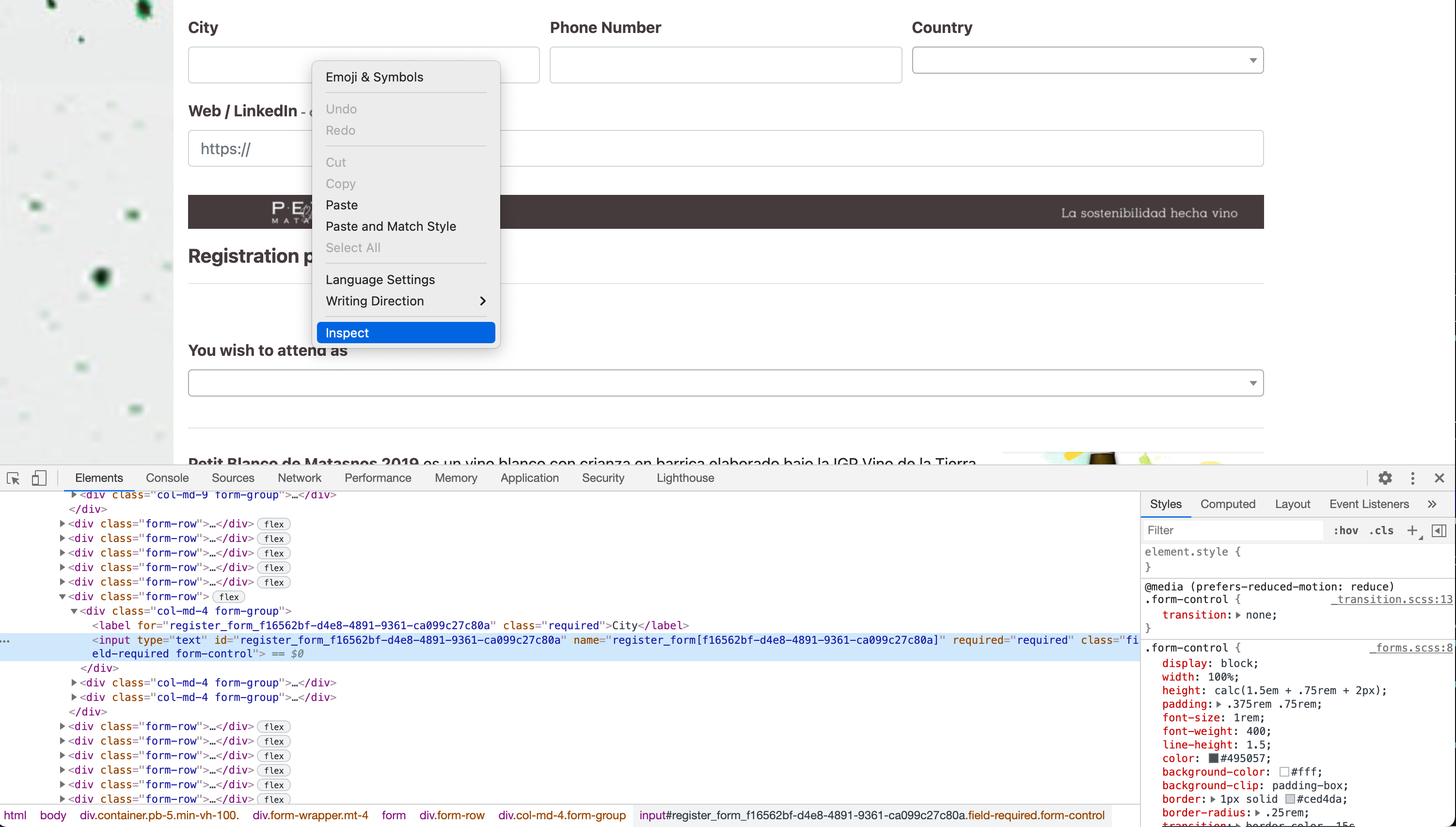
Position the mouse over the form field, and in the right click menu, select Inspect, which will open the Web Inspector
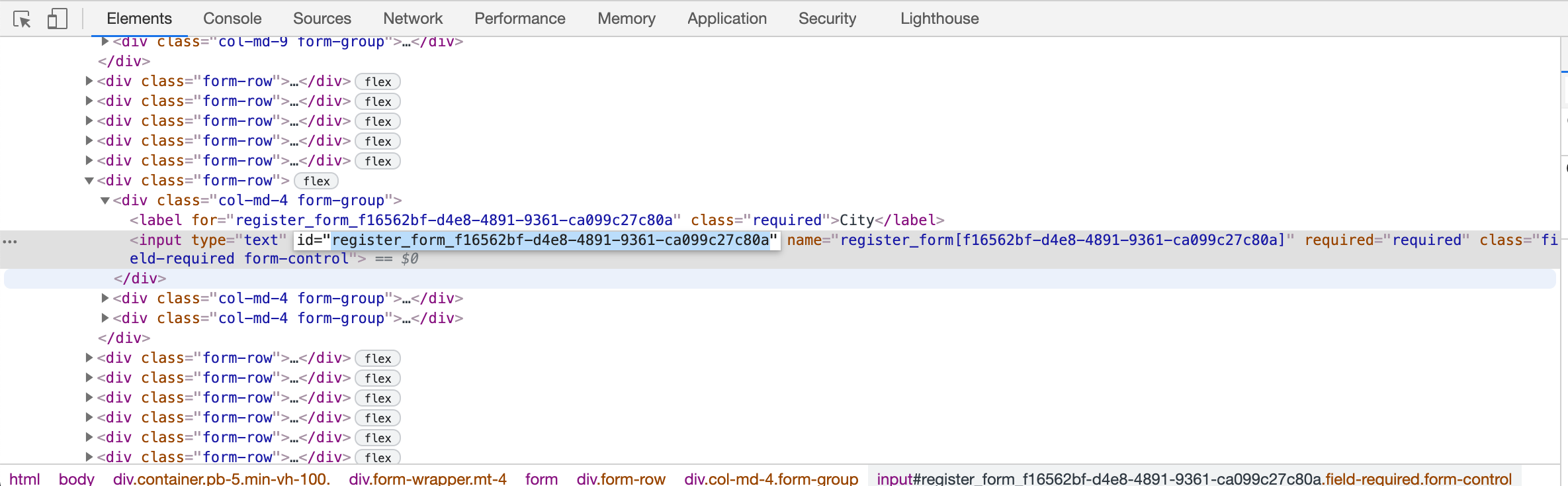
Text fields
Copy the id attribute of the text input or textarea tags
Checkboxes and radio buttons
In the case of checkboxes and radio buttons, the name attribute is shared between the different options but the id attribute varies.
Each id starts equally but includes an incremental number at the end.
For example if the id of a checkbox is register_form_8c2da1f3-cae4-495e-acc0-1c70c45a705a_1, you have to remove the last part _1
The id that you have to send will be register_form_8c2da1f3-cae4-495e-acc0-1c70c45a705a
Select fields
The select fields are replaced with a library that improves their interaction, so the original select is hidden.
When you inspect a select, what you will see is the replacement select not the original one. The original one is the tag named select, which is usually right before the replacement.
The replacement code is similar to this
# Replacement for select
<span class="select2 select2-container select2-container--default select2-container--above select2-container--open" dir="ltr" data-select2-id="3" style="width: 510px;">
    <span class="selection">
        <span
            class="select2-selection select2-selection--single"
            role="combobox"
            aria-haspopup="true"
            aria-expanded="true"
            tabindex="0"
            aria-disabled="false"
            aria-labelledby="select2-register_form_b730d343-5b88-4d6e-98fc-e67d0ac1cf9f-container"
            aria-owns="select2-register_form_b730d343-5b88-4d6e-98fc-e67d0ac1cf9f-results"
            aria-activedescendant="select2-register_form_b730d343-5b88-4d6e-98fc-e67d0ac1cf9f-result-cejr-Estudiante"
        >
            <span class="select2-selection__rendered" id="select2-register_form_b730d343-5b88-4d6e-98fc-e67d0ac1cf9f-container" role="textbox" aria-readonly="true"></span>
            <span class="select2-selection__arrow" role="presentation"><b role="presentation"></b></span>
        </span>
    </span>
    <span class="dropdown-wrapper" aria-hidden="true"></span>
</span>
You have to look for the original select, which looks like this
# Original select
<select
    id="register_form_b730d343-5b88-4d6e-98fc-e67d0ac1cf9f"
    name="register_form[b730d343-5b88-4d6e-98fc-e67d0ac1cf9f]"
    required="required"
    class="field-required form-control select2-hidden-accessible"
    data-select2-id="register_form_b730d343-5b88-4d6e-98fc-e67d0ac1cf9f"
    tabindex="-1"
    aria-hidden="true"
>
    <option value="" selected="selected" data-select2-id="4"></option>
    <option value="Empresa" data-select2-id="9">Company</option>
    <option value="Asistente particular" data-select2-id="10">Attendee</option>
    <option value="Prensa" data-select2-id="11">Press</option>
    <option value="Estudiante" data-select2-id="12">Student</option>
</select>
The identifier for the field will be register_form_b730d343-5b88-4d6e-98fc-e67d0ac1cf9f
Date fields
Use the id attribute of the input tag
Date and time fields
These fields are composed by two inputs, one for the date and one for the time
# Date and time fields
<div id="register_form_b9bb5548-b43f-46d2-89be-ea2197758e16" class="field-required datetimepicker form-inline" placeholder="dd/mm/yyyy">
    <div class="sr-only"></div>
    <input type="text" id="register_form_b9bb5548-b43f-46d2-89be-ea2197758e16_date" name="register_form[b9bb5548-b43f-46d2-89be-ea2197758e16][date]" required="required" class="form-control js-datepicker" placeholder="dd/mm/yyyy" />
    <input type="text" id="register_form_b9bb5548-b43f-46d2-89be-ea2197758e16_time" name="register_form[b9bb5548-b43f-46d2-89be-ea2197758e16][time]" required="required" class="form-control" placeholder="hh:mm" />
</div>
You have to remove the suffix _date or _time to get the identifier.
In the example code, the identifier will be register_form_b9bb5548-b43f-46d2-89be-ea2197758e16
Embedding in iframe tag
When the register form is configured to be embedded in an iframe tag, a message is sent via Window.postMessage() to the parent window.
Those messages are sent
- when the page loads
- when some form fields change their value
The message format is
{
  width: "900px",
  height: "500px"
}
It is not necessary to listen for those messages if your register form does not have conditional fields, or you give the iframe enough height so all the fields are shown always.
If you want to resize the iframe, include this code in your site
<script>
    window.addEventListener('message', function(e) {
        let iframe = document.querySelector("#iframe-identifier");

        // message that was passed from iframe page
        let message = e.data;

        iframe.style.height = message.height + 'px';
        iframe.style.width = message.width + 'px';
    } , false);
</script>
Search
Search attendees
$client = new GuzzleHttp\Client();
$response = $client->request(
    'GET',
    "https://api.eventwoaccess.com/search/attendee",
    [
        'headers' => [
            'Authorization' => "Bearer {$token}",
        ],
        'query' => [
            'q' => 'john',
            'event_id' => 'c55f3174-848f-4e29-92a8-0575162a1dc9',
        ]
    ]
);
[{
    "id": "104a78c8-2a66-4568-b3e1-1b4ee743f685",
    "name": "Sample attendee",
    "created_at": "2020-10-16T13:13:39+00:00",
    "email": "sampleattendee@eventwoaccess.com",
    "position": "CEO",
    "active": true,
    "qr": "https://web.eventwoaccess.com/test-event/attendee/b913de52-d1c7-4f3a-a6a9-ab741513ee1a/qr"
}, {
    "id": "4b7f4024-d52d-4bba-b83d-0f7917a6aabb",
    "name": "Other attendee",
    "created_at": "2020-10-16T13:13:09+00:00",
    "email": "otherattendee@eventwoaccess.com",
    "position": "-",
    "active": true,
    "qr": "https://web.eventwoaccess.com/test-event/attendee/b913de52-d1c7-4f3a-a6a9-ab741513ee1a/qr"
}]
422 Missing query
Missing query string
{
    "message": "Validation failed",
    "errors": [
        {
            "field": "q",
            "code": "missing_field"
        }
    ]
}
422 Missing event
Event does not exist
{
    "message": "Validation failed",
    "errors": [
        {
            "field": "event_id",
            "code": "missing"
        }
    ]
}
Search attendees
HTTP Request
GET https://api.eventwoaccess.com/search/attendee
URL Parameters
| Parameter | Type | Description |
|---|---|---|
| q | string | Query string to search the attendees. It searches by any field of the attendee |
| event_id | string | Event id used to filter the search |
Search events
$client = new GuzzleHttp\Client();
$response = $client->request(
    'GET',
    "https://api.eventwoaccess.com/search/event",
    [
        'headers' => [
            'Authorization' => "Bearer {$token}",
        ],
        'query' => [
            'q' => 'event-name',
        ]
    ]
);
[
    {
        "created_at": "2021-04-04T10:04:15+00:00",
        "date_from": "2021-03-31T22:00:00+00:00",
        "date_to": "2021-04-29T22:00:00+00:00",
        "default_language": "de",
        "id": "c5f06405-a96d-4ece-9d64-3e52ffde7833",
        "languages": [
            "de",
            "en"
        ],
        "name": "test event",
        "slug": "test-event",
        "timezone": "Europe/Berlin",
        "validity_date": "2021-07-04T21:59:59+00:00",
        "register_form": {
            "enabled": true,
            "url": "https://web.eventwoaccess.com/test-event/register"
        }
    },
    {
        "created_at": "2021-03-26T15:56:04+00:00",
        "date_from": "2021-03-07T23:00:00+00:00",
        "date_to": "2021-04-25T22:00:00+00:00",
        "default_language": "es",
        "id": "cd73f2a5-981f-4881-9e5f-2b3cb51e9a47",
        "languages": [
            "es"
        ],
        "name": "Other event",
        "slug": "other-event",
        "timezone": "Europe/Madrid",
        "validity_date": "2021-06-26T21:59:59+00:00",
        "register_form": {
            "enabled": true,
            "url": "https://web.eventwoaccess.com/other-event/register"
        }
    }
]
Search events
HTTP Request
GET https://api.eventwoaccess.com/search/event
URL Parameters
| Parameter | Type | Description |
|---|---|---|
| q | string | Query string to search the events. It searches by any field of the event |
| code | string | Event code used to filter the search |
Webhooks
Webhooks serve to keep your platform in sync with the Access by evenTwo data or execute code after an event happens.
When an event which the webhook is subscribed happens, we will send you a POST request with a json payload, containing the relevant information for that event.
In order to guarantee that the webhooks provide from evenTwo, we send a custom header which you can use to check the validity of the request.
Configuring webhooks
The webhooks are created and configured in the admin interface for your event.
In the webhook creation, you will have to provide an HTTP endpoint and select the event types you want to listen to.
If you want to pause the webhook notifications, you can disable the webhook and activate it later when it is needed.
When you create a webhook, a secret token is automatically generated, That token is needed to verify the authenticity of the webhook requests.
Verifying webhooks signature
// Sample code to verify the webhook signature
$header = $_SERVER['x-eventwo-access-signature'];
$data = file_get_contents('php://input');
$secret = 'the-webhook-secret';

$signature = base64_encode(hash_hmac('sha256', $data, $secret, true));
$signatureIsValid = hash_equals($header, $signature);

if (false === $signatureIsValid) {
    throw new AuthenticationFailedException('Invalid signature for webhook');
}
In every request done to your endpoint we include a header named x-eventwo-access-signature
That header is the HMAC SHA-256 digest of the request body, using the webhook secret as the HMAC key.
When you receive a request from us, it is highly recommended that you calculate its hash and compare it with the
x-eventwo-access-signature header
Webhook reference
Every webhook has different content depending on the type of event.
There are two fields that we always send in all thw webhooks payload
| Key | Description |
|---|---|
| webhook_identifier | A unique identifier for every webhook request |
| webhook_name | The name of the event |
{
    "webhook_identifier": "c34dfa1d-f7c2-4097-9a49-e2c0839ef366",
    "webhook_name": "attendee_added_to_event",
    "attendee":
    {
        "id": "97ac77e0-9308-4c86-b794-4c4a78f629ed",
        "email": "sampleattendee@eventwo.com",
        "name": "Sample Attendee",
        "position": "Support",
        "company": "Access by evenTwo",
        "phone_number": "919999999",
        "active": true,
        "language": "en",
        "registration": {
            "registration-form-field-id-1": {
                "id": "registration-form-field-id-1",
                "label": "First field",
                "type": "text",
                "value": "some value"
            },
            "registration-form-field-id-2": {
                "id": "registration-form-field-id-2",
                "label": "Second field",
                "type": "choice_select",
                "value": [
                    "choice_1",
                    "choice_2"
                ]
            }
        },
        "registration_edit_url": "https://web.eventwoaccess.com/test-event/register/edit/97ac77e0-9308-4c86-b794-4c4a78f629ed"
    },
    "event":
    {
        "id": "953b0307-7ff5-45b4-9808-0cbe0f91bb2e",
        "name": "test event",
        "slug": "test-event",
        "timezone": "Europe/Madrid"
    },
    "invited": false,
    "invitation_date": null,
    "confirmed": true,
    "confirmation_date": "2025-04-30T14:13:12+01:00",
    "confirmation_email_sent": true,
    "tags": [
      {
        "id": "d563b95a-c245-4d98-8d7c-c0d8e714281e",
        "name": "VIP"
      }
    ],
    "rejected": false,
    "rejection_date": null,
    "rejection_email_sent_date": null
}
Attendee added to event
The event is triggered when an attendee is added to an event.
It can happen when an attendee registers with the registration form or if it is added to the event in the web admin.
{
    "webhook_identifier": "2381afeb-c27e-46c7-88a7-f4bfcd63e640",
    "webhook_name": "attendee_attendance_confirmed",
    "attendee":
    {
        "id": "97ac77e0-9308-4c86-b794-4c4a78f629ed",
        "email": "sampleattendee@eventwo.com",
        "name": "Sample Attendee",
        "position": "Support",
        "company": "Access by evenTwo",
        "phone_number": "919999999",
        "active": true,
        "language": "en",
        "registration": {
            "registration-form-field-id-1": {
                "id": "registration-form-field-id-1",
                "label": "First field",
                "type": "text",
                "value": "some value"
            },
            "registration-form-field-id-2": {
                "id": "registration-form-field-id-2",
                "label": "Second field",
                "type": "choice_select",
                "value": [
                    "choice_1",
                    "choice_2"
                ]
            }
        },
        "registration_edit_url": "https://web.eventwoaccess.com/test-event/register/edit/97ac77e0-9308-4c86-b794-4c4a78f629ed"
    },
    "event":
    {
        "id": "953b0307-7ff5-45b4-9808-0cbe0f91bb2e",
        "name": "test event",
        "slug": "test-event",
        "timezone": "Europe/Madrid"
    },
    "invited": false,
    "invitation_date": null,
    "confirmed": true,
    "confirmation_date": "2025-04-30T14:13:12+01:00",
    "confirmation_email_sent": true,
    "tags": [
      {
        "id": "d563b95a-c245-4d98-8d7c-c0d8e714281e",
        "name": "VIP"
      }
    ],
    "rejected": false,
    "rejection_date": null,
    "rejection_email_sent_date": null
}
Attendee confirms attendance
The event is triggered when the attendance of an attendee is confirmed.
It can happen when an attendee registers with the registration form or if it is confirmed in the web admin.
{
    "webhook_identifier": "3f90e0ec-2e28-4e73-b087-82606ddc8c1f",
    "webhook_name": "attendee_attendance_rejected",
    "attendee":
    {
        "id": "97ac77e0-9308-4c86-b794-4c4a78f629ed",
        "email": "sampleattendee@eventwo.com",
        "name": "Sample Attendee",
        "position": "Support",
        "company": "Access by evenTwo",
        "phone_number": "919999999",
        "active": true,
        "language": "en",
        "registration": {
            "registration-form-field-id-1": {
                "id": "registration-form-field-id-1",
                "label": "First field",
                "type": "text",
                "value": "some value"
            },
            "registration-form-field-id-2": {
                "id": "registration-form-field-id-2",
                "label": "Second field",
                "type": "choice_select",
                "value": [
                    "choice_1",
                    "choice_2"
                ]
            }
        },
        "registration_edit_url": "https://web.eventwoaccess.com/test-event/register/edit/97ac77e0-9308-4c86-b794-4c4a78f629ed"
    },
    "event":
    {
        "id": "953b0307-7ff5-45b4-9808-0cbe0f91bb2e",
        "name": "test event",
        "slug": "test-event",
        "timezone": "Europe/Madrid"
    },
    "invited": false,
    "invitation_date": null,
    "confirmed": false,
    "confirmation_date": "2025-04-30T12:03:12+01:00",
    "confirmation_email_sent": true,
    "tags": [
      {
        "id": "d563b95a-c245-4d98-8d7c-c0d8e714281e",
        "name": "VIP"
      }
    ],
    "rejected": true,
    "rejection_date": "2025-04-30T14:13:12+01:00",
    "rejection_email_sent_date": null
}
Attendee rejects attendance
The event is triggered when the attendance of an attendee is rejected.
It can happen if the attendee updates its attendance in the website or if it is rejected in the web admin.
{
    "webhook_identifier": "c34dfa1d-f7c2-4097-9a49-e2c0839ef366",
    "webhook_name": "checkpoint_reading_created",
    "attendee":
    {
        "id": "97ac77e0-9308-4c86-b794-4c4a78f629ed",
        "email": "sampleattendee@eventwo.com",
        "name": "Sample Attendee",
        "position": "Support",
        "company": "Access by evenTwo",
        "phone_number": "919999999",
        "active": true,
        "language": "en",
        "registration": {
            "registration-form-field-id-1": {
                "id": "registration-form-field-id-1",
                "label": "First field",
                "type": "text",
                "value": "some value"
            },
            "registration-form-field-id-2": {
                "id": "registration-form-field-id-2",
                "label": "Second field",
                "type": "choice_select",
                "value": [
                    "choice_1",
                    "choice_2"
                ]
            }
        },
        "registration_edit_url": "https://web.eventwoaccess.com/test-event/register/edit/97ac77e0-9308-4c86-b794-4c4a78f629ed"
    },
    "event":
    {
        "id": "953b0307-7ff5-45b4-9808-0cbe0f91bb2e",
        "name": "test event",
        "slug": "test-event",
        "timezone": "Europe/Madrid"
    },
    "checkpoint": {
        "id": "d3d6aa60-610e-4237-9932-ee0e6364362c",
        "name": "Main CheckPoint",
        "primary": true,
        "active": true,
        "tags": []
    },
    "reading_date": "2021-03-17T10:51:39+01:00"
}
Checkpoint reading is created
The event is triggered when a reading is created in a checkpoint.
It can happen when the attendee QR code is scanned, or a reading is added manually in the event admin.
{
    "webhook_identifier": "fd48b90e-5584-4a1b-b553-de7f3c282569",
    "webhook_name": "attendee_removed_from_event",
    "attendee":
    {
        "id": "97ac77e0-9308-4c86-b794-4c4a78f629ed",
        "email": "sampleattendee@eventwo.com",
        "name": "Sample Attendee",
        "position": "Support",
        "company": "Access by evenTwo",
        "phone_number": "919999999",
        "active": true,
        "language": "en"
    },
    "event":
    {
        "id": "953b0307-7ff5-45b4-9808-0cbe0f91bb2e",
        "name": "test event",
        "slug": "test-event",
        "timezone": "Europe/Madrid"
    }
}
Attendee removed from event
The event is triggered when an attendee is removed from the event.
It can happen when an attendee is removed from the event in the web admin.
{
    "webhook_identifier": "ae14ae5f-5186-4b2b-98ff-fe3b979d7e9f",
    "webhook_name": "attendee_updated",
    "attendee":
    {
        "id": "97ac77e0-9308-4c86-b794-4c4a78f629ed",
        "email": "sampleattendee@eventwo.com",
        "name": "Sample Attendee",
        "position": "Support",
        "company": "Access by evenTwo",
        "phone_number": "919999999",
        "active": true,
        "language": "en",
        "registration": {
            "registration-form-field-id-1": {
                "id": "registration-form-field-id-1",
                "label": "First field",
                "type": "text",
                "value": "some value"
            },
            "registration-form-field-id-2": {
                "id": "registration-form-field-id-2",
                "label": "Second field",
                "type": "choice_select",
                "value": [
                    "choice_1",
                    "choice_2"
                ]
            }
        },
        "registration_edit_url": "https://web.eventwoaccess.com/test-event/register/edit/97ac77e0-9308-4c86-b794-4c4a78f629ed"
    },
    "event":
    {
        "id": "953b0307-7ff5-45b4-9808-0cbe0f91bb2e",
        "name": "test event",
        "slug": "test-event",
        "timezone": "Europe/Madrid"
    },
    "invited": false,
    "invitation_date": null,
    "confirmed": true,
    "confirmation_date": "2025-04-30T14:13:12+01:00",
    "confirmation_email_sent": true,
    "tags": [
      {
        "id": "d563b95a-c245-4d98-8d7c-c0d8e714281e",
        "name": "VIP"
      }
    ],
    "rejected": false,
    "rejection_date": null,
    "rejection_email_sent_date": null
}
Attendee updated
The event is triggered when the attendee data is updated.
It can happen when an attendee updates its data in the registration form or is updated in the web admin.
{
    "webhook_identifier": "fbaabf5d-0721-4f45-8ae0-fea63c3bf6aa",
    "webhook_name": "lead_attendee_registered",
    "attendee":
    {
        "id": "97ac77e0-9308-4c86-b794-4c4a78f629ed",
        "email": "sampleattendee@eventwo.com",
        "name": "Sample Attendee",
        "position": "Support",
        "company": "Access by evenTwo",
        "phone_number": "919999999",
        "photo": "https://web.eventwoaccess.com/test-event/attendee/photo/xpo31glXbRZWMAqzPYJoe7d40n3q17Pjed3GzmRAD8bJXBoYxwqW8XEqbrxxfJBpmgolDvtB0lv2XzyOZW45rE9ngpKNvVlk0Q6M2p5N9kOvEB1Kxj8mrGQ2VD6J6gPG",
        "registration": {
            "registration-form-field-id-1": {
                "id": "registration-form-field-id-1",
                "label": "First field",
                "type": "text",
                "value": "some value"
            },
            "registration-form-field-id-2": {
                "id": "registration-form-field-id-2",
                "label": "Second field",
                "type": "choice_select",
                "value": [
                    "choice_1",
                    "choice_2"
                ]
            }
        },
        "registration_edit_url": "https://web.eventwoaccess.com/test-event/register/edit/97ac77e0-9308-4c86-b794-4c4a78f629ed",
        "language": "en",
        "status": "registered",
        "created_at": "2025-04-30T11:57:13+00:00",
        "updated_at": "2025-04-30T11:57:13+00:00"
    },
    "attendance": {
        "invited": false,
        "invitation_date": null,
        "confirmed": true,
        "confirmation_date": "2025-04-30T14:13:12+01:00",
        "confirmation_email_sent": true,
        "tags": [
          {
            "id": "d563b95a-c245-4d98-8d7c-c0d8e714281e",
            "name": "VIP"
          }
        ],
        "rejected": false,
        "rejection_date": null,
        "rejection_email_sent_date": null
    },
    "event":
    {
        "id": "953b0307-7ff5-45b4-9808-0cbe0f91bb2e",
        "name": "test event",
        "slug": "test-event",
        "timezone": "Europe/Madrid"
    },
    "registration_id": "f6825393-c6a4-4286-9900-9f4dfb366001"
}
Attendee registers
The event is triggered when an attendee registers in the registration form.
{
    "webhook_identifier": "b5a35546-55e5-4731-896c-5a7f3863d00f",
    "webhook_name": "lead_attendee_updated",
    "attendee":
    {
        "id": "97ac77e0-9308-4c86-b794-4c4a78f629ed",
        "email": "sampleattendee@eventwo.com",
        "name": "Sample Attendee",
        "position": "Support",
        "company": "Access by evenTwo",
        "phone_number": "919999999",
        "photo": "https://web.eventwoaccess.com/test-event/attendee/photo/xpo31glXbRZWMAqzPYJoe7d40n3q17Pjed3GzmRAD8bJXBoYxwqW8XEqbrxxfJBpmgolDvtB0lv2XzyOZW45rE9ngpKNvVlk0Q6M2p5N9kOvEB1Kxj8mrGQ2VD6J6gPG",
        "registration": {
            "registration-form-field-id-1": {
                "id": "registration-form-field-id-1",
                "label": "First field",
                "type": "text",
                "value": "some value"
            },
            "registration-form-field-id-2": {
                "id": "registration-form-field-id-2",
                "label": "Second field",
                "type": "choice_select",
                "value": [
                    "choice_1",
                    "choice_2"
                ]
            }
        },
        "registration_edit_url": "https://web.eventwoaccess.com/test-event/register/edit/97ac77e0-9308-4c86-b794-4c4a78f629ed",
        "language": "en",
        "status": "registered",
        "created_at": "2025-04-30T11:57:13+00:00",
        "updated_at": "2025-04-30T14:18:13+00:00"
    },
    "attendance": {
        "invited": false,
        "invitation_date": null,
        "confirmed": true,
        "confirmation_date": "2025-04-30T14:13:12+01:00",
        "confirmation_email_sent": true,
        "tags": [
          {
            "id": "d563b95a-c245-4d98-8d7c-c0d8e714281e",
            "name": "VIP"
          }
        ],
        "rejected": false,
        "rejection_date": null,
        "rejection_email_sent_date": null
    },
    "event":
    {
        "id": "953b0307-7ff5-45b4-9808-0cbe0f91bb2e",
        "name": "test event",
        "slug": "test-event",
        "timezone": "Europe/Madrid"
    },
    "registration_id": "f6825393-c6a4-4286-9900-9f4dfb366001"
}
Attendee updates its registration data
The event is triggered when an attendee updates its registration data in the registration form.
{
    "webhook_identifier": "46e22637-8b21-4b84-ba65-c79fef1e5179",
    "webhook_name": "ticketing_sale_created",
    "attendee":
    {
        "id": "97ac77e0-9308-4c86-b794-4c4a78f629ed",
        "email": "sampleattendee@eventwo.com",
        "name": "Sample Attendee",
        "position": "Support",
        "company": "Access by evenTwo",
        "phone_number": "919999999",
        "active": true,
        "language": "en",
        "registration": {
            "registration-form-field-id-1": {
                "id": "registration-form-field-id-1",
                "label": "First field",
                "type": "text",
                "value": "some value"
            },
            "registration-form-field-id-2": {
                "id": "registration-form-field-id-2",
                "label": "Second field",
                "type": "choice_select",
                "value": [
                    "choice_1",
                    "choice_2"
                ]
            }
        },
        "registration_edit_url": "https://web.eventwoaccess.com/test-event/register/edit/97ac77e0-9308-4c86-b794-4c4a78f629ed"
    },
    "event":
    {
        "id": "953b0307-7ff5-45b4-9808-0cbe0f91bb2e",
        "name": "test event",
        "slug": "test-event",
        "timezone": "Europe/Madrid"
    },
    "ticket": {
        "id": "2f47eb8e-4b61-4ff3-aa27-8a8b3ede3c77",
        "name": [
          {
            "lang": "en",
            "text": "Premium access"
          }
        ],
        "code": null,
        "price": {
          "currency": "EUR",
          "amount": 100.00
        }
    },
    "sale": {
        "id": "15aeebd6-67e5-42c0-817c-c86e2a46c561",
        "payment_provider": "stripe",
        "payment_id": "merchant_payment_id"
    }
}
Attendee buys a ticket
The event is triggered when an attendee buys a ticket when registering.
If the ticket is paid, it includes the payment information.
{
    "webhook_identifier": "8bda0f81-3e58-45e0-bb47-acd429f929c8",
    "webhook_name": "workshop_seat_created",
    "attendee":
    {
        "id": "97ac77e0-9308-4c86-b794-4c4a78f629ed",
        "email": "sampleattendee@eventwo.com",
        "name": "Sample Attendee",
        "position": "Support",
        "company": "Access by evenTwo",
        "phone_number": "919999999",
        "active": true,
        "language": "en",
        "registration": {
            "registration-form-field-id-1": {
                "id": "registration-form-field-id-1",
                "label": "First field",
                "type": "text",
                "value": "some value"
            },
            "registration-form-field-id-2": {
                "id": "registration-form-field-id-2",
                "label": "Second field",
                "type": "choice_select",
                "value": [
                    "choice_1",
                    "choice_2"
                ]
            }
        },
        "registration_edit_url": "https://web.eventwoaccess.com/test-event/register/edit/97ac77e0-9308-4c86-b794-4c4a78f629ed"
    },
    "attendance": {
        "invited": false,
        "invitation_date": null,
        "confirmed": true,
        "confirmation_date": "2025-04-30T14:13:12+01:00",
        "confirmation_email_sent": true,
        "tags": [
          {
            "id": "d563b95a-c245-4d98-8d7c-c0d8e714281e",
            "name": "VIP"
          }
        ],
        "rejected": false,
        "rejection_date": null,
        "rejection_email_sent_date": null
    },
    "event":
    {
        "id": "953b0307-7ff5-45b4-9808-0cbe0f91bb2e",
        "name": "test event",
        "slug": "test-event",
        "timezone": "Europe/Madrid"
    },
    "workshop": {
      "id": "c524e4aa-055b-4859-8f8c-bdf681d2f1bb",
      "title": [
        {
          "lang": "en",
          "text": "Marketing introduction"
        }
      ],
      "grouping": {
        "id": "2fac0f92-3196-4f78-902a-8f2e38c6a397",
        "title": [
          {
            "lang": "en",
            "text": "Main day workshops"
          }
        ]
      }
    }
}
Workshop seat is created
The event is triggered if an attendee selects a workshop during registration or later when editing its registration data